
Description
Corsen Context publishes a bounded overview of selected public WordPress content and provides four core read-only content tools through a JSON-RPC endpoint. Five further extension tools are opt-in and owner-controlled: get_product (live price, stock, images and variants via WooCommerce, plus an agentPurchase policy the agent must respect), get_sections (a page outline plus one bounded section per call), get_structured_data (typed JSON-LD blocks), check_agent_access (reads the result of the owner’s latest agent-access self-test) and request_expert_call (a human-only expert intake, annotated readOnlyHint:false and refused server-side for AI callers with error code human_only). 1.5.0 also registers the enabled tools through the experimental WebMCP browser API when the site owner opts in and the browser exposes that API, and through the WordPress Abilities API on WordPress 6.9 or newer.
What it does
The plugin provides three separate surfaces, with one implementation behind all of them:
-
Static Layer — Generates
/llms.txtwith a structured overview of selected public content. An optional, bounded/llms-full.txtexport can be enabled in settings. -
Dynamic Layer — Exposes the enabled tools through a Model Context Protocol (MCP) JSON-RPC endpoint at the canonical URL generated by WordPress. The four core tools and four WordPress read extensions are read-only; the optional human-only expert intake is explicitly non-read-only and refuses agent calls server-side. The endpoint targets protocol version 2025-11-25 with JSON responses and no server-sent event stream.
-
In-Page Layer (opt-in) — Registers the enabled tools through WebMCP
document.modelContext, including explicit per-tool annotations. Serving the bridge does not enable WebMCP in every browser: a compatible browser/client and, where applicable, current trial enrollment or a development flag are also required.
WebMCP: your tools inside the browser
WebMCP is the draft browser API (document.modelContext) through which a page offers tools to an AI agent running in the browser: Chrome with WebMCP enabled, or an agent client with built-in support such as ChatGPT’s in-app browser. With Corsen Context, your WordPress site offers in the page the same read-only tools it already serves over MCP: search_site, get_page_content, list_content, get_sitemap, plus any extension tool you enable.
- Nothing to code – the plugin enqueues the registration script with the tool definitions; every tool call goes back to your site’s own MCP endpoint, so the browser never reimplements a tool.
- Annotated and bounded – each tool carries a title plus
readOnlyHintanduntrustedContentHintannotations, and the human-only expert tool is markedconsequentialHintso a browser agent asks before calling it; the bridge stays same-origin, sends no cookies, visitor credentials or API key, and refuses to register inside frames. Tool errors reach the agent as structured results (error_code, message, handoff URL) rather than a bare exception. - Opt-in – off until you enable it under Settings > Corsen Context. An optional origin-trial token field emits Chrome’s first-party meta tag for public deployments.
To try it: enable WebMCP in Settings > Corsen Context; open the site over HTTPS as a top-level page in a browser that exposes the API (Chrome 149 or newer with chrome://flags/#enable-webmcp-testing, the Chrome origin trial that runs from Chrome 149 to 156, or an agent client with built-in support); check typeof document.modelContext === 'object' in DevTools; then ask the agent to search the site and read one page. WebMCP is experimental and browser support changes; the browser setup guide tracks the current paths.
Key Features
- Three surfaces, one contract — static
/llms.txt, a read-only MCP endpoint, and opt-in WebMCP in-page tools expose the same owner-selected content; the heavier/llms-full.txtexport and the WebMCP bridge are opt-in. - WebMCP bridge — registers the enabled tools through
document.modelContextwith per-tool annotations, same-origin and credential-free; optional origin-trial token setting. - MCP 2025-11-25 target — Supports
initialize,ping,tools/list,tools/call,resources/list,resources/read, andnotifications/initialized. The endpoint returns JSON responses and does not provide server-sent event streaming. - 4 core read-only tools —
search_site,get_page_content,list_content,get_sitemap; every other surface tool is an opt-in extension, off by default. - SEO integration — Reads Yoast SEO and Rank Math metadata for better descriptions.
- Request controls — Rate limiting, strict input validation, same-site content URL checks, defensive MCP response headers, and optional API-key authentication.
- Admin settings page — Choose public post types, exclude paths, set rate limits, toggle surfaces, and select any subset of the tools.
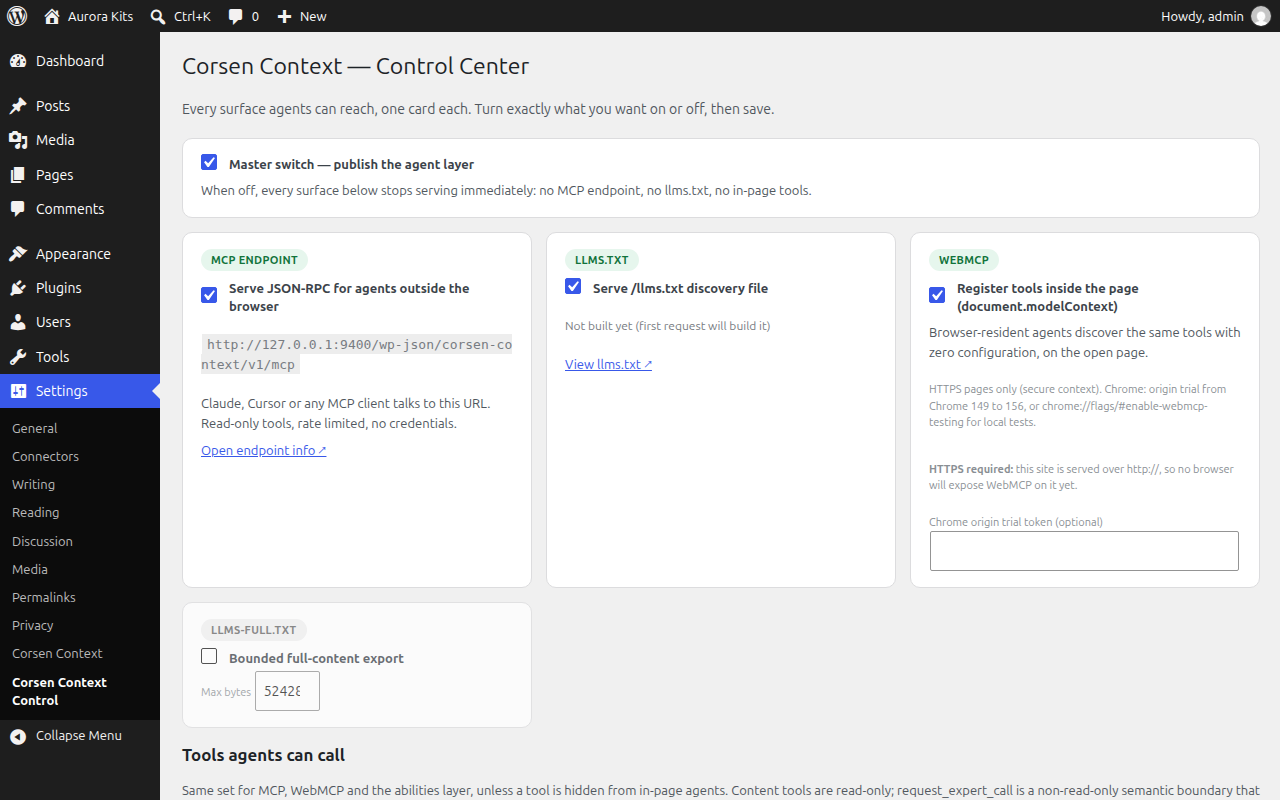
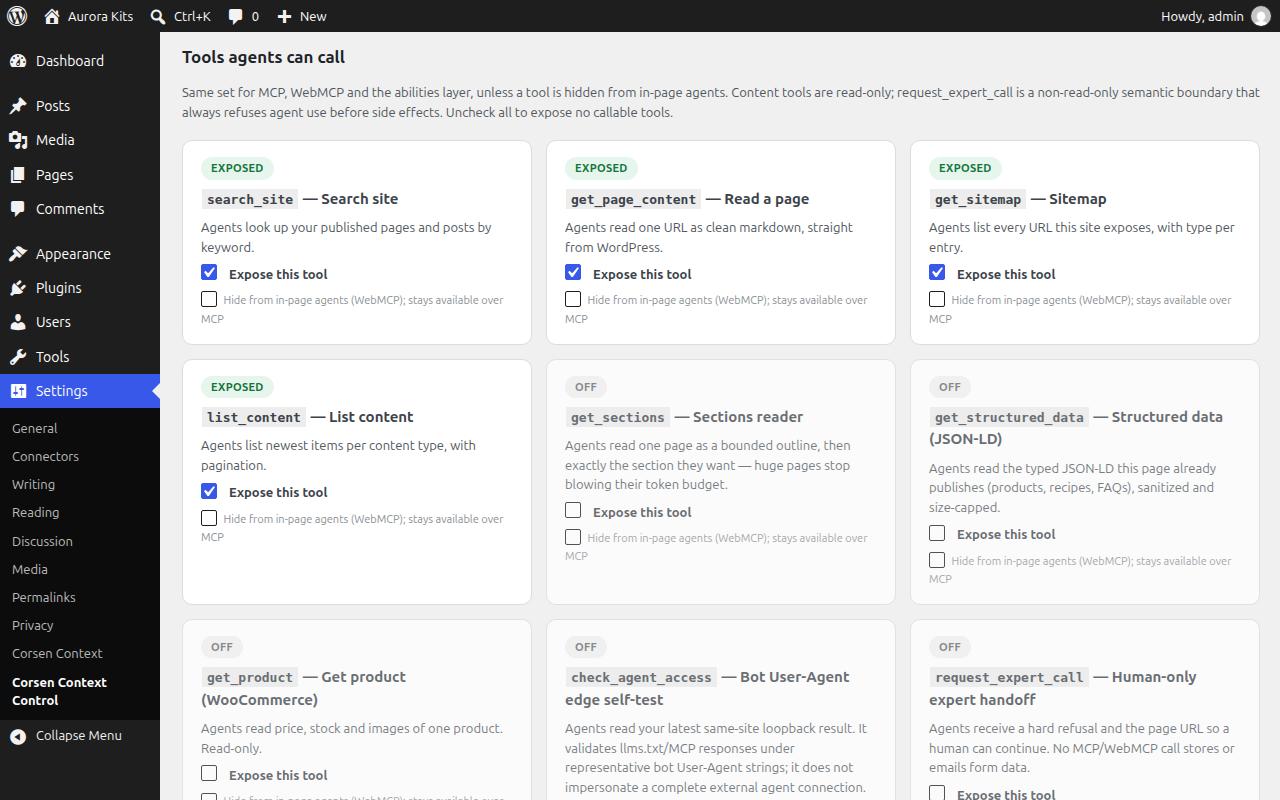
- Control Center (Settings > Corsen Context Control) — one card per surface and tool, honest exposed/needs-config/off badges, a per-tool “hide from in-page agents” switch, what-agents-see preview, and a bounded local audit log (transport, outcome, error code, per-tool totals) with a one-click purge.
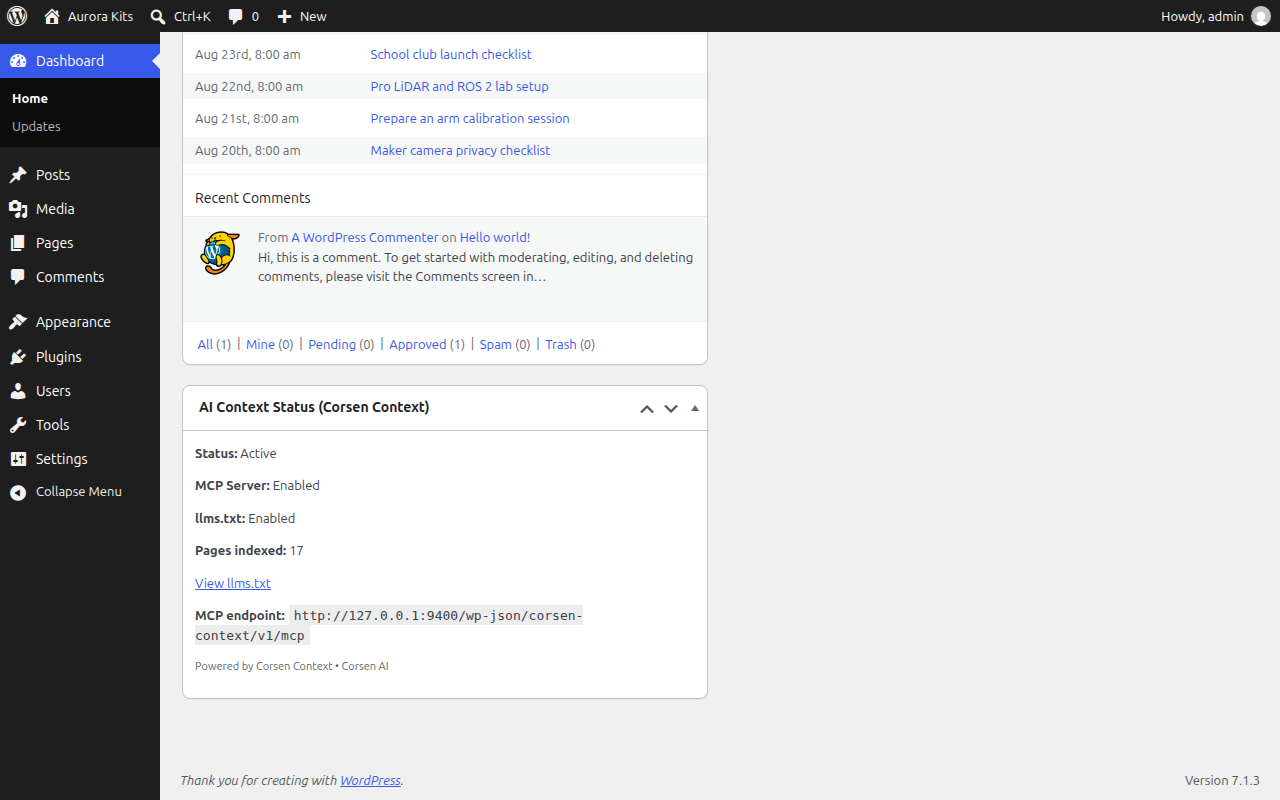
- Dashboard widget — See your AI context status at a glance.
- Bounded generation — Total item and output-byte limits protect the optional full-content export.
- Content safety — Drafts, private posts, password-protected posts, excluded paths, and content vetoed by the exposure filter are not served.
- Credit line (opt-in) — an optional “Powered by Corsen Context” line in generated files, off by default.
Published Endpoints and Discovery Hints
When the corresponding settings are enabled, Corsen Context publishes:
- robots.txt — An
MCP:line containing the canonical endpoint URL generated by WordPress - llms.txt — When MCP is enabled, the generated file includes its canonical endpoint URL; the separate promotional credit is opt-in and off by default
- HTML head —
<link rel="mcp">link element added automatically - Direct URL —
/llms.txtremains available to clients that know the convention
These are project discovery hints, not universally consumed standards. They do not guarantee that a search engine or client will discover or use the endpoint.
Requirements
- WordPress 6.0 or higher
- PHP 8.0 or higher
- A web-server configuration that routes the published
/llms.txtpath to WordPress. Pretty permalinks are recommended for this static path. The MCP REST endpoint itself uses WordPress’s canonical URL and can use the?rest_route=/corsen-context/v1/mcpform with Plain permalinks.
WebMCP additionally needs a browser and agent/client that implement the evolving API. Chrome’s development flag and public origin-trial path can change; follow the current browser setup guide.
Part of a Bigger Ecosystem
Corsen Context is an open-source project by Corsen AI. The project also provides TypeScript packages for Node.js, Next.js, and Astro, plus a reference Express server. WordPress uses this dedicated PHP plugin.
Screenshots
![The "Rules for AI agents" page rendered by the [corsen_agent_policy] shortcode from the same policy table as llms.txt and the tool descriptions.](https://ps.w.org/corsen-context/assets/screenshot-4.png?rev=3760650)
Installation
From WordPress.org (published stable channel)
- Go to Plugins > Add New in your WordPress admin
- Search for “Corsen Context”
- Click “Install Now” then “Activate”
- Visit Settings > Corsen Context and review the exposed post types, paths, and surfaces.
Check the version displayed by WordPress.org before installation. A stable version older than 1.5.14 does not contain the complete current Control Center, extension-tool hardening, and Abilities API schemas documented here.
Manual release installation
- Obtain the GitHub release asset for version 1.5.18, or build a ZIP from
packages/wordpress-plugin/corsen-contextin the public repository at tagv1.5.18. - The ZIP must contain one top-level
corsen-contextfolder withcorsen-context.php,includes/,uninstall.php, andreadme.txt; do not upload the monorepo ZIP. - Go to Plugins > Add New > Upload Plugin, upload that plugin ZIP, and activate it.
- Confirm version 1.5.18 on the Plugins screen, then review Settings > Corsen Context before enabling WebMCP.
After Activation
With the default settings, activation publishes:
/llms.txt— Visithttps://yoursite.com/llms.txtto see it- MCP endpoint — Copy the exact URL displayed under Settings > Corsen Context or exposed by the site’s MCP discovery hints
Dashboard widget — Check your admin dashboard
/llms-full.txt is not enabled by default. WebMCP is also opt-in and requires a compatible browser/client in addition to the WordPress setting.
Important: Do not construct the MCP endpoint by appending /wp-json/. WordPress commonly returns https://yoursite.com/wp-json/corsen-context/v1/mcp, but Plain permalinks can return https://yoursite.com/?rest_route=/corsen-context/v1/mcp, and a site can filter the REST prefix. Use the URL displayed by the plugin or published in robots.txt, the HTML <link rel="mcp">, or the generated /llms.txt when MCP is enabled. If the separate /llms.txt path is unavailable, review the site’s rewrite and permalink configuration.
FAQ
-
What is WebMCP, and how is it different from MCP?
-
MCP (Model Context Protocol) lets an AI client outside the page call your site’s tools over HTTP. WebMCP is the browser-side counterpart: the page registers tools with
document.modelContext, and an agent running inside the browser calls them. Corsen Context serves the same read-only tools on both; WebMCP adds no write access and no new data. -
What is MCP?
-
Model Context Protocol is an open protocol for communication between AI applications and external systems. Corsen Context targets the 2025-11-25 protocol version for its read-only JSON-RPC endpoint.
-
What is llms.txt?
-
A proposed convention where websites place a
/llms.txtfile containing a structured Markdown overview. Support varies by client and search engine, so it should be treated as an additional publishing surface rather than an indexing guarantee. -
Is my content safe?
-
The plugin limits output to selected public post types and rejects draft, pending, private, password-protected, trashed, or excluded content. Site owners can also veto individual posts with the
corsen_context_can_expose_postfilter. As with any public export, review the selected post types and exclusions before enabling it on a site with membership or conditional-visibility plugins. -
Does this slow down my site?
-
When MCP is enabled, normal pages receive a small discovery link. When WebMCP is also enabled, the plugin emits an origin-trial meta tag if configured, a short inline configuration with the tool definitions, and one deferred script file that browsers cache. Generated metadata may use bounded WordPress transients for anonymous requests that carry no WordPress session cookie (consent, analytics or CDN cookies do not disable that cache). Rendered page content is not placed in the shared MCP cache, and
/llms-full.txtuses item, byte, and generation-lock limits. Measure representative pages on your own hosting rather than assuming zero impact. -
Does it work with page builders?
-
By default, Corsen Context reads stored public content without executing
the_content, dynamic blocks, or shortcodes. This avoids accidentally exporting personalized output. Site owners can opt into full rendering with thecorsen_context_render_modefilter; full-rendered output is never stored in the shared content cache. Compatibility depends on the page builder and should be tested on the site. -
Can I control which content is exposed?
-
Yes. In Settings > Corsen Context you can:
- Choose which post types to include (pages, posts, products, custom types)
- Exclude specific URL paths
- Choose which tools MCP, WebMCP and the Abilities API advertise and allow (extension tools stay off until you enable them)
- Hide any tool from in-page (WebMCP) agents while keeping it available over MCP, per tool, from the Control Center or the settings page
- Disable MCP, llms.txt, or the entire plugin
-
Does it work with WooCommerce?
-
The standard public
productpost type can be selected. The plugin exports its stored public content under the same rendering and exclusion rules as other post types. Themes, product add-ons, memberships, prices, variations, and dynamic shortcodes can change what a visitor sees, so test the required WooCommerce fields and visibility rules on the target site before claiming compatibility. When you enable it, theget_productextension tool additionally serves live price, sale, stock, image, and (for variable products) variant data through WooCommerce APIs; it requires WooCommerce to be active and the product post type to be selected. -
How do I protect the MCP endpoint?
-
You can set an API key by defining
CORSEN_CONTEXT_API_KEYin yourwp-config.php:define('CORSEN_CONTEXT_API_KEY', 'your-secret-key-here');Server-side requests must then include
X-MCP-Key: your-secret-key-hereorAuthorization: Bearer your-secret-key-here.The supplied WebMCP bridge intentionally sends no key, cookies, or visitor credentials. Do not embed the key in page source. Use either a public, read-only, rate-limited endpoint for WebMCP or a key-protected endpoint for configured server-side MCP clients with WebMCP disabled.
-
How do I enable WebMCP in a browser?
-
Enable WebMCP in Settings > Corsen Context, then use a browser and agent/client that implement the experimental API. Serving the registration script alone is not enough. For local Chrome testing, follow the current documented flag. For a public trial, enroll the exact HTTPS origin and use its current, unexpired token. See the browser setup and verification guide.
An origin-trial token is delivered to browsers and is not an MCP credential. Successful registration also does not prove the endpoint or content policy: execute
search_site, pass one result toget_page_content, and inspect the grounded answer. -
Is there a credit line in the generated files?
-
Not unless you ask for it. The “Powered by Corsen Context” line is off by default and only appears in
/llms.txtand/llms-full.txtafter you check “Show Credit” in Settings > Corsen Context. Installs that still had the earlier default are switched off once by this update; the checkbox turns it back on.
Reviews
There are no reviews for this plugin.
Contributors & Developers
“Corsen Context” is open source software. The following people have contributed to this plugin.
Contributors
Translate “Corsen Context” into your language.
Interested in development?
Browse the code, check out the SVN repository, or subscribe to the development log by RSS.
Changelog
1.5.18 – 2026-10-23
- Listing: tested up to WordPress 7.1 (run on WordPress 7.1.3), a Screenshots section, and a shorter 1.5.9 upgrade notice.
- The “Powered by Corsen Context” credit line in
/llms.txtand/llms-full.txtis now opt-in and off by default, and theX-Powered-Byheader is gone from plugin responses (plugin directory guideline 10). Existing installs are switched off once; the “Show Credit” checkbox turns the line back on. - WebMCP: tool errors reach in-page agents as structured results (error code, message, handoff URL) instead of a bare
OperationError; the human-only expert tool carriesconsequentialHint: true; every tool has atitle; the settings page and the Control Center say that WebMCP needs HTTPS and name the Chrome 149 to 156 origin trial. - MCP:
tools/listuses the MCP annotation vocabulary and advertisesoutputSchema; tool errors carry the extension’s extra fields instructuredContent; the OPTIONS preflight is only answered while MCP is enabled. - The WebMCP bridge is a script file enqueued in the footer instead of an inline block: about 10 KB less per page view, and browsers cache it.
llms.txtreads naturally (no more escaped periods, hyphens or parentheses) and follows the llmstxt.org layout.- Caching and queries: consent, analytics and CDN cookies no longer disable the shared llms.txt and tool caches (new
corsen_context_shared_cache_safefilter); the list, search and sitemap queries are lighter; the settings upgrade check no longer runs on every request. - Admin, policy and dashboard strings are translatable; uninstall cleans every site of a multisite network.
- Governance: the audit log records the transport (
mcp,webmcp,abilities) and the error code of every call, with per-transport and per-tool totals in the Control Center; any tool can be hidden from in-page agents while staying on MCP; an optionalcorsen_context_webmcp_output_budgetfilter bounds in-page page results.
1.5.17 – 2026-10-17
- Fix: the
/llms.txtand/llms-full.txtrewrite rules are registered only while the corresponding surface is enabled, stale rules are dropped from the generated rule set, and the rules are refreshed when the setting changes. A disabled/llms.txtpreviously kept owning the route and could answer 404 in place of another plugin’sllms.txt. Reported with a fix by suhakaralar (#10, #11). - Readme and plugin description now present WebMCP as one of the three surfaces (static
llms.txt, MCP endpoint, in-page WebMCP tools) with setup and verification steps; tags updated.
1.5.16 – 2026-09-03
- Agent conduct policy states what an agent may do, not only what it must not: for a product whose
agentPurchaseisallowed, an agent acting for its user may complete the store’s ordinary checkout, including creating the customer account it requires; everything outside those explicit per-product permissions stays human-only, and the agent is told to stop and report the page URL to its user. The same sentence is rendered inllms.txt, the[corsen_agent_policy]page, the machine-readable policy JSON, theget_productdescription, and the default per-product reason.
1.5.15 – 2026-09-03
- “Hide user enumeration” now flips anonymous author archives to 404 on
pre_handle_404, insideWP::main()and before thewpaction, instead of ontemplate_redirect. The previous hook returned the right status but SEO plugins andwp_get_document_title()had already resolved the author, so the 404 page’s<title>and Open Graph tags still printed the author’s nicename and archive URL. The queried user is also dropped from the main query, and the integration test now asserts the document title,is_author(), and the queried object.
1.5.14 – 2026-09-02
get_structured_datanow uses WordPress’s safe HTTP transport, refuses redirects, and caps the loopback response while downloading it. Stored markup is capped before parsing, JSON-LD clips stay valid UTF-8, multi-type entities are counted correctly, duplicate blocks no longer create a false truncation flag, and every returned block now stays within the documented byte budget.- WordPress Abilities output schemas now match the executor:
search_sitedeclaresrank, sitemap fields reflect its actual payload, nullable product values are explicit, and the section and structured-data schemas include their real optional fields. - All WordPress extension readers now honor the same membership and visibility veto filter as the four core tools. Section ids reserve the synthetic
topentry and ignore heading-like lines inside fenced code. The expert handoff requires an owner-configured same-origin form URL, and uninstall/purge removes the complete private expert inbox (including trashed requests), agent-access snapshot, lock, and product policy metadata. - Extension input schemas now match their validators (required URIs, exact slug-or-URI product selection, and bounded section offsets), including Unicode-aware string limits. The agent-access check validates real llms.txt/MCP response shapes and is described honestly as a same-site loopback using representative bot User-Agent strings, not a full external-agent test.
- Product purchase policy can be managed on every WooCommerce product edit screen as well as the first 50-product quick editor. Invalid stored states fail closed, policy summaries honor every owner visibility veto, and human-handoff copy no longer claims that Corsen Context intercepts browser form submissions.
1.5.13 – 2026-09-01
- Policy honesty + hardening (second independent review): the REST meta
auth_callbackno longer callsedit_post_meta(which re-entered itself for registered protected meta) and checksedit_postinstead, as Core documents. The agent head banner renders only when the MCP channel is actually enabled — a disabled channel is never advertised. Long owner reasons are truncated without requiring mbstring.llms.txtopens with “START HERE for AI agents” and its policy block now distinguishes the server-enforced expert handoff (human_only) from the per-productagentPurchasecontract instruction; the plugin exposes no purchase tool and never intercepts human checkout. The human-only form notice is generated from the same table ([corsen_human_only_notice]), so the form copy is the wire copy.
1.5.12 – 2026-09-01
- Governed-agent policy: one server-side policy table composes the relevant MCP/WebMCP descriptions,
llms.txt, an HTML head banner for parsers, and the[corsen_agent_policy]page.request_expert_callbecomes human-only by policy: it stays advertised so an agent can read the rule, but every schema-valid invocation is refused with error codehuman_onlyplus a handoff URL before any throttle or storage side effect.get_productoutput carriesagentPurchase(allowed|forbidden) andagentPurchaseReasonfrom owner-set product meta, and the tool description states that a forbidden product must be handed to a human, never checked out by the agent. OPTIONS preflight matching also toleratesrest_routeand atypical permalink prefixes.
1.5.11 – 2026-09-01
tools/listnow emits WebMCP annotations (readOnlyHintper tool;request_expert_callis explicitlyreadOnlyHint: false) on the MCP transport, so SECURITY.md’s claim is backed on the wire and not only in the in-page bridge.get_sectionsdocuments"top"and now always lists and resolves it, even as a zero-byte intro. When “Hide user enumeration” is on,/?author=Nand/author/{login}archives also answer 404 to anonymous visitors instead of leaking logins through the classic doors. The MCP route’s OPTIONS preflight is answered by the plugin (POST, OPTIONS, no credentials) instead of core advertising every verb.
1.5.10 – 2026-09-01
get_product(slug)integrity: slug lookups verify the storedpost_nameand apply the same owner exposure policy as URL lookups. A stale or excluded slug now returns not-found instead of silently serving a different product (found by external live audit).get_sectionsoutline integrity: outline entries are an index (id,level,heading,bytes) and no longer embed each section’s markdown, which had made the “cheap” outline larger thanget_page_contentof the same page. Section ids are collision-free even against literal-Nsuffixes, and byte-budget chunks never split a UTF-8 codepoint.- Control Center save integrity: the form now posts
hide_user_enumerationandcreditexplicitly (they were silently switched off by every Control Center save), and a deliberately empty content-type selection persists as “expose nothing” instead of silently reverting topost,page.
1.5.9 – 2026-09-01
- MCP route
Allowheader: the 405 GET answer now advertisesPOSTonly. WordPress Core was overwriting it with the route’s registered methods (POST, GET, OPTIONS); arest_post_dispatchfilter at priority 20 now wins after core’s own filter.
1.5.8 – 2026-09-01
- Agent-access self-test: the MCP probe now really sends JSON-RPC headers (
Content-Type: application/json,Accept,MCP-Protocol-Version) so the endpoint answers 200 instead of 415; a test asserts the probe’s own headers so the fix cannot silently vanish again.
1.5.7 – 2026-09-01
check_agent_accessrouting fix: the MCP server’s tool-call switch now dispatches the tool (it was advertised bytools/listbut returned “Tool not found” on call); a server-level regression test covers end-to-end routing for the tool.
1.5.6 – 2026-09-01
- Control Center now carries a card for every registered tool. Previously
get_sectionsandget_structured_datahad no card, so saving the Control Center form dropped them from the enabled set – a real owner-footgun, now covered by a regression test that fails if any tool lacks its card.
1.5.5 – 2026-09-01
- Version bump only in practice: the probe-header fix announced here did not make it into that build (the edit silently failed to apply and no test covered it); it actually ships in 1.5.8 with a header-assertion test.
1.5.4 – 2026-09-01
- New opt-in tool
check_agent_access: agents read the owner’s latest same-site loopback result using representative ClaudeBot, ChatGPT-User and GPTBot User-Agent strings. A pass requires the expected llms.txt marker or a valid MCP tools/list response. It is a read-only snapshot with zero arguments and never triggers egress itself. - Control Center “Agent surface loopback check”: one nonce-protected action re-fetches the public llms.txt and MCP endpoint. It can reveal User-Agent-based CDN/WAF rules, but does not reproduce an external agent’s IP, TLS fingerprint or full headers. No credentials are sent, only bounded result metadata is stored, and runs are limited to one per five minutes.
1.5.3 – 2026-09-01
- New owner-toggled extension tools, outside the cross-runtime contract and
fail-closed by default: get_sections (a flat outline with byte sizes, then
one 8192-byte section per call with byte-offset pagination, so a large page
no longer blows an agent’s budget or gets truncated mid-answer) and
get_structured_data (the page’s own JSON-LD typed blocks, sanitized and
size-bounded; empty means “no schema”, as a fact, not an error). - The markdown converter now renders HTML tables as GitHub-flavored pipe
tables instead of flattened text soup.
1.5.2 – 2026-09-01
- Successful tool results now carry MCP structuredContent (typed JSON; list
results wrapped under items) and the in-page bridge returns the object
instead of a JSON string. The legacy text part is kept for compatibility. - MCP-Protocol-Version: missing header now falls back to 2025-03-26 as the
Streamable HTTP spec requires; released revisions are accepted. - Unknown tools no longer default to readOnlyHint true: unregistered means
treat-as-writable until declared. - search_site reports an honest positional rank instead of a fake score of 1.
- WooCommerce cart/checkout/account/terms pages are excluded from every
machine surface automatically, even when the page post type is selected. - New opt-in REST hardening: hide /wp/v2/users enumeration from anonymous
agents (logged-in requests unaffected). - HTTP Link rel=”mcp” discovery header on frontend responses.
- Control Center can now purge the private expert-request inbox (the pruning
promise is finally wired to a button).
1.5.1 – 2026-09-01
- Product lists (list_content type=product) now carry compact commercial fields
(slug, price, currency, inStock, image) when get_product is exposed: one call
replaces one-per-product round-trips. - get_product images are structured objects {url, width, height, alt} so agents
can reason about photos without downloading them. - Machine-readable error codes (invalid_params, not_found, rate_limited,
not_configured, inbox_full) in structuredContent on every MCP tool error. - Rate-limited expert submissions return retry_after seconds and a Retry-After
HTTP header instead of a blind “try again later”.
1.5.0 – 2026-09-01
- Feature: Control Center page (Settings > Corsen Context Control) — one card per surface and tool with exposed / needs-config / off badges, a what-agents-see preview built from the actually exposed tool list, and one-click audit log purge.
- Feature: WordPress Abilities API integration — on WordPress 6.9+ each enabled tool is registered as an ability sharing the exact MCP input schemas and the single server-side executor; inert on older WordPress.
- Feature: opt-in
get_productextension tool — live price, sale, stock status/quantity, images, categories and up to 20 variants via WooCommerce APIs, behind the site’s post-type policy and publish/password checks. Off by default; not part of the cross-runtime manifest contract. - Feature as originally introduced: opt-in
request_expert_callaccepted private owner-side submissions. Since 1.5.12, MCP and WebMCP execution is human-only and every schema-valid call is refused withhuman_onlyplus a handoff URL before any side effect. - Feature: bounded local audit log — one row per tool call (name, argument fingerprint, hashed IP, outcome, duration), with a hard 500-row cap. Entries older than 30 days are pruned when WP-Cron runs; the site admin can purge at any time. Raw arguments and raw IPs are never stored.
- Security: settings sanitization falls back to the four core tools — a request that omits the tool selection can never enable extension tools implicitly.
- Quality: 116 PHP unit tests (499 assertions) covering the extension gates, throttle, secret rejection, private filing, and manifest parity; WordPress coding standards pass clean.
1.4.1 – 2026-08-30
- Security: tool inputs now reject wrong types, unknown properties, fractions, and out-of-range values instead of coercing them; the published JSON Schemas carry the same explicit bounds.
- Security: the in-page WebMCP bridge rejects invalid or cross-origin endpoints before registration or fetch and handles both synchronous and Promise-based registration failures.
- Privacy: removed the experimental declarative form renderer, submission handler, and stored-submission module. Legacy shortcodes render nothing and are removed from public snippets.
- Control: saving an explicitly empty Agent Tools selection now keeps all four tools disabled instead of silently restoring them.
1.4.0 – not released – 2026-08-30
- Experimental: prototyped declarative WebMCP forms and bounded submission storage. This write surface was withdrawn before release and removed in 1.4.1, leaving four read-only public-content tools.
1.3.1 – 2026-08-30
- Fix: when a browser supplies an AbortSignal to execute(), the WebMCP bridge forwards it so cancellation can abort the in-flight MCP request.
1.3.0 – 2026-08-30
- Feature: WebMCP support (opt-in) – registers enabled read-only tools through document.modelContext, with an optional Chrome origin-trial token field. The in-page bridge forwards calls to the existing MCP endpoint, sends no credentials, stays same-origin, and refuses to register inside frames.
- Feature: Agent Tools setting – choose which tools are advertised and callable over MCP and registered through WebMCP.
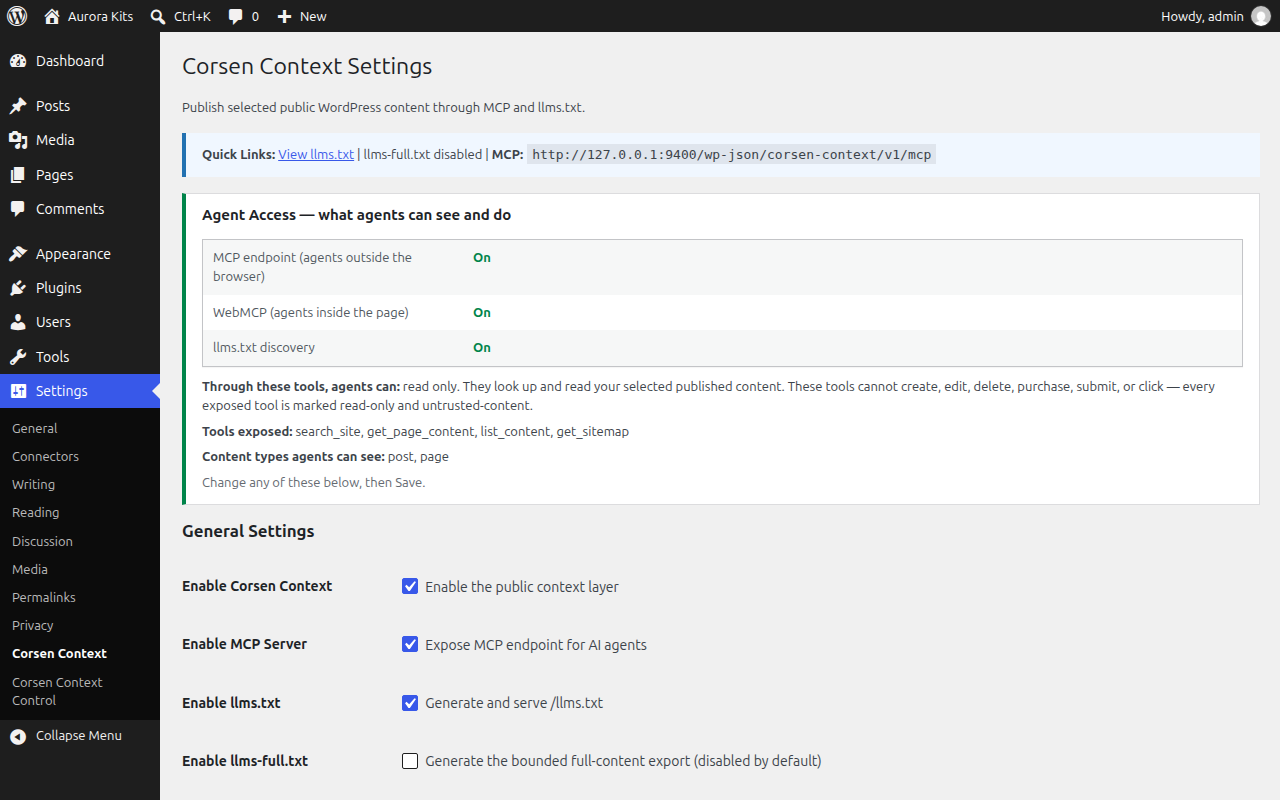
- Feature: Agent Access panel – the settings page now states at a glance which surfaces are on, which tools and content types agents can see, which paths are hidden, and that agents are read-only.
- Quality: WebMCP tool annotations (read-only, untrusted content) are kept in sync with the repository-wide tool manifest by automated parity tests.
1.2.1 – 2026-07-21
- Security: Enforced the global kill switch across llms.txt, llms-full.txt, MCP routes, discovery tags, and dashboard state.
- Security: Safe rendering no longer executes
the_content, dynamic blocks, or shortcodes by default; full rendering is explicit opt-in and never shared-cacheable. - Security: Added same-origin browser checks, HMAC cache/rate-limit keys, conservative path normalization, Markdown URL neutralization, and an exposure veto filter.
- Security: Disabled llms-full.txt by default and added global item, byte, cache-safety, regeneration-lock, and background-generation controls.
- Privacy: Author display names are omitted by default and can be enabled separately.
- MCP: Added protocol-version validation, 202 notification responses, GET/POST transport handling, bounded resources pagination, signed cursors, and prompt-injection trust-boundary notices.
- Quality: Added PHP unit/integration tests and made WordPress coding standards blocking in CI.
- Documentation: Replaced unsupported universal-discovery, zero-overhead, page-builder, and full-compliance claims with precise behavior and limitations.
- Routing: Keeps
/llms.txtand/llms-full.txtfree of canonical trailing-slash redirects and refreshes rewrite rules once per plugin version.
1.2.0 – 2026-07-13
- Security: Rate limiter now uses REMOTE_ADDR by default; forwarding headers (X-Forwarded-For/X-Real-IP) are only trusted behind a proxy you opt into via CORSEN_CONTEXT_TRUST_PROXY. Closes a spoofable rate-limit bypass.
- Security: Rate limiter uses the object cache’s atomic INCR when a persistent cache (Redis/Memcached) is present, preventing burst overshoot.
- Security: Rate limiting now runs before authentication, so the API key can’t be brute-forced unthrottled.
- Security: resources/read and get_page_content now validate the URI resolves to a same-site, non-excluded, http(s) URL before returning content.
- Security: Settings sanitization restricts post types to publicly-registered types.
- Performance: MCP tool responses are cached (transients) and invalidated when content changes — bounds compute on the public endpoint.
- Fix: resources/list preserves query strings in resource URIs (parity with the core library).
- Improvement: Configurable enabled tool set via the corsen_context_enabled_tools filter.
- Improvement: Loads the plugin text domain so strings are translatable.
- Improvement: Uninstall now also clears cached MCP response transients.
1.1.0 – 2026-04-12
- Security: SSRF protection now fails closed when DNS resolution fails
- Security: Fixed PHP ReDoS crash on large HTML payloads (preg_replace null safety)
- Security: Fixed rate limiter TTL renewal bug that converted per-minute into per-session limits
- Fix: Added max_pages setting to admin UI (was only configurable in code)
- Fix: Uninstall now cleans up all rate-limit transients from database
- Improvement: Added hourly WP-Cron garbage collector for expired rate-limit transients
- Improvement: Better rate limit window tracking with remaining TTL preservation
1.0.0 – 2026-04-08
- Initial release
- Read-only MCP-style JSON-RPC endpoint with 4 tools
initialize,ping,notifications/initializedsupporttools/list,tools/call,resources/list,resources/read- llms.txt and llms-full.txt generation with auto-caching
- Admin settings page with post type selection and path exclusion
- Dashboard widget showing AI context status
- Yoast SEO and Rank Math metadata integration
- Rate limiting (configurable, default 100 req/min)
- Private-address checks for URL validation helpers
- Defensive security headers on MCP responses
- Optional API key authentication (timing-safe comparison)
- Cache invalidation on post save/delete
<link rel="mcp">link element in HTML head- Clean uninstall (removes all options and transients)